100for100 Hosting
http://www.100for100.com
How To Set Up FTP with WSFTP
- Download the FTP software: (ws-ftp)
- Follow the instructions and install the FTP software into your computer.
- Dial up to the internet
- Launch the FTP software - You'll see the following box:
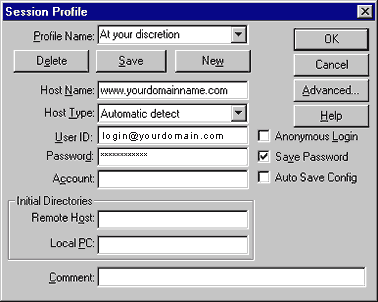
Fill in the following:
- Profile name: at your discretion (for example, ABC)
- Host Name: www.yourdomain.com or www.yourdomain.com.sg
- Host Type: select "Automatic Detect"
- Username: (as provided in your email confirmation)
- Password: (as provided in your email confirmation)
Click on "Save Password".
Leave the other fields blank
Click OK
Note: If you have problems at this stage, please email us at support@h1studio.com now.
Subject: FTP Log-in problem. Please type the error message.
You'll be brought to the following screen
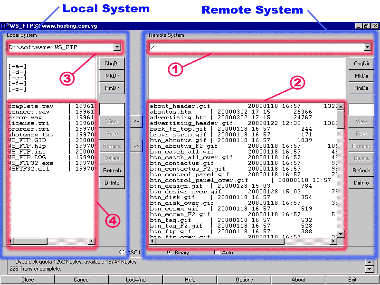
Remote System (right hand side)
(the number lists below corresponds to that of the image above.)
- 1. The top field is a default setting
- 2. The 3rd field (from top) shows all the existing design files on your web site. eg, index.html testimonials.html, members.html, contactus.gif
Local System (left hand side)
(the number lists below corresponds to that of the image above.)
- 3. The top field shows where all your files have been stored in your computer Eg, c:\webpage\abc means all your files are stored in your hard-drive, under the main directory "webpage" and sub-directory "abc"
- 4. The 3rd field (from top) lists all the design files in the above directory in your computer. eg, index.html, testimonials.html, members.html, contactus.gif.
If the field is blank, you'll need to first download all the files from your website to your computer by clicking on the < button.
Assuming you have made changes to the members.html page on your computer and want to upload it to your website now:
- 3rd left field -(3): move your mouse and click once over the file members.html
- Click on the --> button (this indicates that you are uploading the amended file to your web site. The previous file would be over-written as it is saved under the same name)
To do a check that you have successfully replaced the members.html page, simply type ww.yourdomain.com/members.html and you should see the revised pages.